catnet-tui
Keyboard-first, interactive Terminal UI for network scanning. Built in Go with Bubble Tea, powered by catnet-io/engine.


catnet-tui — 80x24
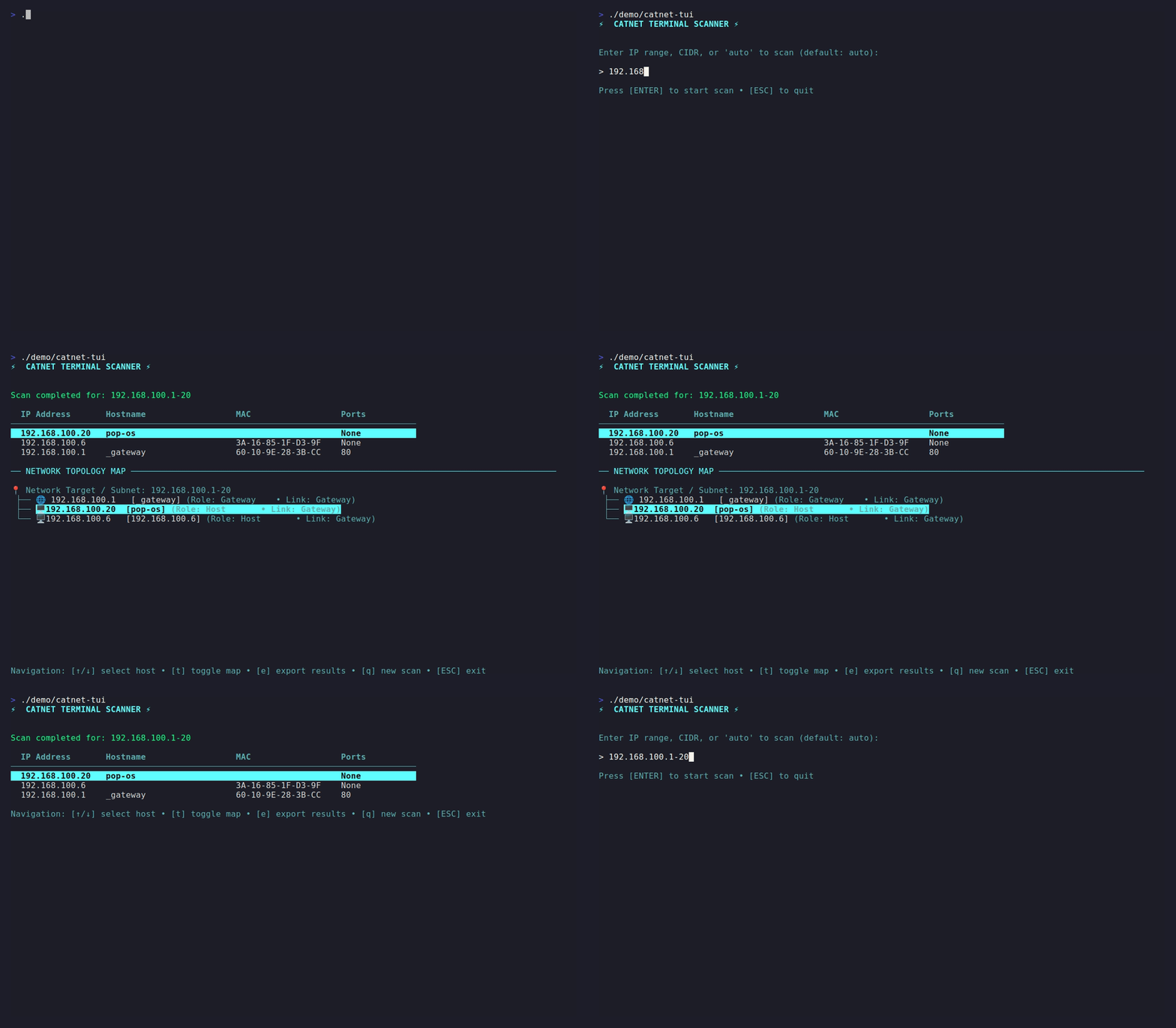
Interactive Target Input
Automatic target detection (auto) or explicit CIDR input with clean, keyboard-centered input forms.
Real-Time Streaming
Live scan progress updating in real time with instant abort capability (q / Esc).
Live Host Discovery
Dynamic updating host list with rich Lipgloss terminal styling and clear visual status indicators.
Why TUI?
CatNet provides CLI, Desktop, and TUI interfaces. Here is how catnet-tui fits into your workflow:
❓ Why not just use the CLI (
catnet-io/catnet)?
The CLI is optimized for shell scripts, automated pipelines, and stdout redirection.
catnet-tui provides an interactive, visually rich interface directly in your terminal — ideal for live monitoring, rapid target entry, and interactive scan control without writing complex CLI flags.
❓ Does this replace the Desktop App (
catnet-io/app)?
No. The Desktop App (Wails + React) is designed for graphical environments, offering persistent SQLite scan history and visual comparison diffing.
catnet-tui brings a fast, lightweight terminal UI for SSH sessions, headless servers, and terminal purists.
❓ How does it connect to the scanning engine?
catnet-tui contains zero scanning logic. It acts as a pure presentation layer consuming live event channels from catnet-io/engine (via ScanStream), ensuring high performance and identical scan results across all CatNet clients.
Install in 30 Seconds
Choose your preferred installation method below:
brew install catnet-io/tap/catnet-tuiscoop bucket add catnet https://github.com/catnet-io/scoop-bucket
scoop install catnet-tuicurl -sSL https://github.com/catnet-io/tui/releases/latest/download/catnet-tui_Linux_x86_64.tar.gz | tar xz
sudo mv catnet-tui /usr/local/bin/
catnet-tui versiongo install github.com/catnet-io/tui/cmd/catnet-tui@latestInteractive Workflow & Keybindings
Launch the Terminal UI by running:
catnet-tuiKeybindings & Controls
| Key / Action | Description |
|---|---|
| Enter | Submit target (e.g. 192.168.1.0/24 or auto) and start scanning |
| q / Esc | Abort active scan and return to target input |
| Ctrl+C | Exit application safely without goroutine leaks |
Part of the CatNet Ecosystem
CatNet is a complete network scanning suite designed for terminal users, automation scripts, and graphical desktops.
| Repository | Role | Description | |
|---|---|---|---|
| ⚙️ | catnet-io/engine | Shared scanning engine | High-performance, asynchronous scanning library in Go. |
| 💻 | catnet-io/catnet | Scriptable CLI | CLI client optimized for terminal pipelining. |
| 🖥️ | catnet-io/app | Desktop GUI | Cross-platform desktop application (Wails + React) with local SQLite history and scan comparison diffing. |
| 📟 | catnet-io/tui | Terminal UI | Keyboard-centric interactive Terminal UI built with Bubble Tea. |